RocketSim
Description
AINo LLM description has been generated for this analysis yet. Click Reanalyze to produce one.
Fingerprint
- Platform
- macOS
- Type
- executable
- Arch
- x86_64, arm64
- Min OS
- 15.0.0
- SDK
- 26.2.0
- File Size
- 40.3 MB
- UUID
- 4F719516-00BF-339A-B370-8EC5D16EC633
- Analyzed
- 2026-05-06T10:49:38Z
- Team ID
- 4QMDKC8VLJ
- CDHash
- 2bd85d0df4479a4640cd2d08b14299886f1e341f3ed21c4a2e9b219207c8cca4
- MD5
- 5441ffd18a0ad4c3bc40fd3e275810ca
- SHA1
- 5778ac61e422516a9ad34501a685f45eaf21a4a3
- SSDEEP
- 393216:0qZSf0QPGomdAToEsea02yhy1PlXfnEGojB7bir:0ISf0QPfYAdwyk1HYg
History
- First seen
- 2026-04-0927d ago
- Last seen
- 2026-04-0927d ago
- Sighting
- 1
Observed as
- RocketSim
App Store listing
Enriched
RocketSim for Xcode Simulator
- Publisher
- SwiftLee
- App Store version
- v16.0.0
- Category
- Developer Tools
- Price
- Free
- Min OS (listing)
- 15.0
- Current version
- 2026-05-06
- First released
- 2020-04-22
- Listing size
- 51.8 MB
- Also in
- Utilities
- Languages
- EN
What's newv16.0.0
New:
- RocketSim now supports connected physical iOS devices: USB-connected iPhones appear in live preview windows with side-window controls, screenshots, disconnect-safe video recording with audio, comparing overlays, and device-specific window positioning.
- Added Physical Devices settings for USB support, network-detected devices, and ignored devices, including an in-window option to hide a device you do not want RocketSim to manage.
- Added a dedicated `CLI & Agent` settings page with installers for the bundled `rocketsim` command line tool and agent skill. The CLI installs as a symlink into a folder you pick on your PATH, so App Store updates keep it up to date automatically.
- Added `rocketsim doctor` to verify the CLI install, RocketSim app discovery, IPC reachability, simulator state, AX permission, and snapshot-store readiness before you hand control to an agent.
- Added `rocketsim screenshot` as a plain PNG fallback command for agents and automations that need visual context.
Improved:
- VoiceOver overlay is now faster and more complete, including elements like tab bars and nav bars. CLI performance improved by 25x.
- Physical device windows are more reliable and polished, with dark preview chrome, full-bleed device bezels, corner resizing, restored window positions, cleaner USB discovery, and improved reconnect behavior.
- The agent protocol now emits one consistent `rs/1` JSON envelope with typed errors across `elements`, `screen`, `interact`, `wait`, `do`, `snapshot`, and `doctor`, making it easier for external agent skills and automations to consume reliably.
- Agent interactions are now more robust: `interact` settles against fresh snapshots, stale `--screen` hashes fail fast, screen-change waits advance to fresh snapshots, coordinate swipes route through real HID gestures, and `interact scroll` can resolve the nearest scrollable ancestor from a visible child element.
- Agent snapshots now surface sparse web content, perception recovery hints, and ambiguity hints for duplicate labels so agents can recover with visual fallback when accessibility data is incomplete.
Fixed:
- Fixed RocketSim Connect payload handling running on the main thread, reducing profiling noise and avoiding unnecessary main-thread compression work in linked apps. (Thanks, K. Titov!)
- App Actions add/edit sheets now always render in dark mode, matching the rest of RocketSim's floating UI. (Thanks, L. Tuss!)
- App Actions configurations shared via Git no longer regenerate identifiers on every launch, eliminating noisy diffs across team members and making the JSON file safe to commit. Locations are now imported from the file as well. (Thanks, N. Yun!)
- Network Monitoring now reconnects reliably after rerunning a simulator app without needing to restart RocketSim. (Thanks, Tonni Hyldgaard!)
- Fixed recordings automatically exporting visible touch indicators even when touches were turned off, while still keeping captured touches available in the post editor for retrospective enabling. (Thanks, G. Gerber!)
- Fixed automatic breakpoint installation for RocketSim Connect. (Thanks, L. Hurtado!)
- Fixed the Voice Over overlay getting stuck without elements when the active Simulator window was temporarily unavailable. (Thanks, A. Mohamad!)
- Fixed device bezels for iPhone 14 Plus, iPhone 15 Pro, iPhone 15 Pro Max, iPhone 16 and iPhone 16 Plus rounding the screen content with the wrong radius, which left a transparent halo at the corners.
Description
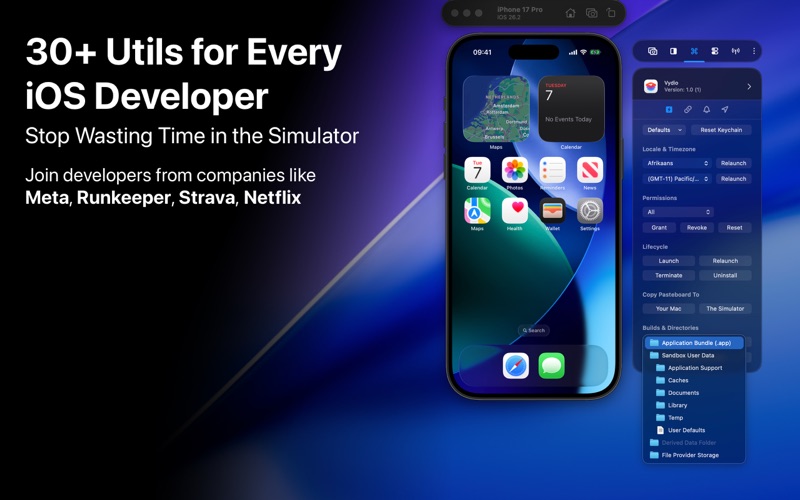
RocketSim enhances the Xcode Simulator for iOS and iPadOS development: boost productivity and streamline your workflow with capture, networking, build insights, and quick actions beside the Simulator. Developers report building, testing, and verifying apps up to 2x faster per RocketSim Developer Research.
Key Highlights
- Polish screenshots and App Store Connect preview videos: open captures in the editor from the floating thumbnail, then tune bezels, touches, backgrounds, metadata, trim, and GIF export with App Store Connect-friendly dimensions—ideal for Swift, SwiftUI, and UIKit demos
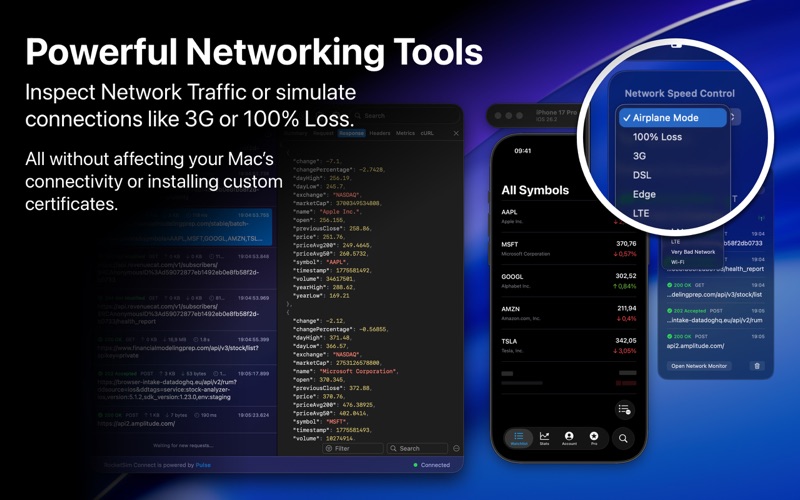
- Debug networking without proxy certificates: throttle or drop traffic, Airplane Mode for your running app only, and inspect traffic via RocketSim Connect; use Copy Summary when you need a redacted line to paste into Slack or an agent prompt
- Track local build time trends next to Xcode with Build Insights across versions
- Exercise universal links, APNs payloads, GPS and time zones, environment overrides, and a VoiceOver overlay with keyboard navigation from the side window
- Pro: Simulator framebuffer recording up to 120 fps for fluid motion
Feature Breakdown
Screenshots and Recordings
- Start from the Captures tab in the side window; after capture, refine in the editor before export
- Bezels, touch callouts, optional metadata, audio, trim, GIF conversion
- Pro: 120 fps framebuffer recording when supported
Networking
- Simulate slow or lossy networks without slowing your Mac
- Per-app Airplane Mode in the Simulator only
- Inspect requests and responses; metrics; cURL export; trace export; Copy Summary for redacted sharing
- Speed control and monitor share a dedicated Networking area in the side window for quicker discovery
Accessibility
- VoiceOver overlay with keyboard navigation for testing in the Simulator without juggling a device as often
- Environment overrides from the side window: Bold Text, Dark Mode, Dynamic Type, and more—without opening Settings.app
- Tinted Liquid Glass legibility live on iOS 26 simulators
Build Insights
- Build count and duration trends in the main and side windows
- Compare performance across Xcode versions your team runs
Quick Actions for Builds
- Clear Derived Data globally or for the current app
- Open common app folders without Finder archaeology
- Grant, revoke, or reset permissions without reinstall churn
Compare Designs
- Overlay Figma, Sketch, or Zeplin frames on live UI
- Slider mode for pixel-level SwiftUI and UIKit checks
Design Tools and Magnify
- Grids and rulers in on-screen points; slow animations for layout polish
- Pixel zoom with color sampling as code
Deeplinks and Push Notifications
- Fire universal links and push payloads with the debugger attached
- Actions from recent builds; clipboard URL history; shareable Quick Action groups
- Grid or list layout for long route or push lists
Location Simulation
- Routes or single-pin GPS; time zones from a chosen place; Maps and travel flows
User Defaults Editor
- Live-edit standard and App Group defaults—flags, debug toggles, plist-backed state
Simulator Camera
- Mac camera in Simulator for AVFoundation, QR, and Vision-style demos
Full Customization
- Menu bar access including Open GitHub Issues
- Shortcuts and floating windows matched to your workflow
Trusted by Developers Everywhere
RocketSim is used daily by thousands of developers and 200+ teams—including teams at Meta, Runkeeper, and MacWhisper—to ship iOS apps with less friction. It fits TestFlight, App Store Connect, the Apple Developer app, and everyday Xcode use.
Xcode® is a trademark of Apple Inc., registered in the U.S. and other countries.
Terms of use: https://www.rocketsim.app/terms/
¹ Based on RocketSim Developer Research of 2024
Screenshots